Evidence, corrections, and judgment
Correct the decision that shaped the takeoff.
DeepTakeoff links each review finding to its source and affected work. Correct the input behind a takeoff result, apply a change to one cabinet or a shared fact, and inspect what the software rebuilds.
Bid Readiness
Work from a finding to the affected source.
The review queue connects scope, references, takeoff, and pricing findings to their evidence. The action depends on what is missing: a drawing relationship, a construction fact, or a commercial decision.
Make the missing connection.
DeepTakeoff exposes unresolved references and lets you repair missing connections on the drawing. Newly referenced, detected Sections can then enter the project for processing.
- On a Plan
- Use Find Callouts or Edit Elevation Callouts to repair the drawing’s references.
- On an Elevation
- Add the missing Section Callout and choose its target.
- Then review
- The linked drawing, its identity, and the affected Room or construction evidence.
Rebuild the takeoff from a corrected Section target.
DeepTakeoff lets you replace the target of a misread Section Callout, then rebuilds the affected construction interpretation.
- Inspect
- The drawn Callout and the candidate Sections.
- Correct
- Use Replace callout to name the intended Section.
- Then review
- The rebuilt takeoff and the affected construction facts.
Resolve the material mapping before quoting.
DeepTakeoff combines material evidence from drawings, schedules, and specifications, then resolves the requirement against your configured catalog.
- Inspect
- The drawing code and supporting specification answers.
- Resolve
- The intended material mapping and conflicting answers.
- Then review
- The effective material on the item and quote.
Coverage needs its own review. A correctly interpreted Elevation does not establish that every Room or source drawing has been included.
Work project
AI can work through a correction and inspect what changes.
From Bid Readiness, Work project investigates findings it has tools to address. It can read the current Elevation, governing Sections, layout, and takeoff before making a supported change.
Those tools include takeoff-property corrections, run-edge geometry, and eligible Section-reference replacements. The worker checks the rebuilt result before keeping a correction.
- 1
Inspect the evidence and the current interpretation.
Identify the input responsible for the finding and the source that supports a change.
- 2
Change the supported input.
Correct a fact, boundary, or eligible Section target. A person's existing Callout decision is not overwritten by the worker.
- 3
Rebuild and check the affected work.
Wait for processing to finish, inspect the resulting state, and take back a correction if its check rejects it.
- 4
Leave unresolved findings for your review.
Attempts are bounded. Missing Callouts, ambiguous ownership, and shop-specific choices remain under your control.
This describes the correction process. A successful check is evidence for reviewing that change, not a guarantee that the entire bid is complete.
Source facts and their reach
Know which cabinets a correction will affect.
DeepTakeoff tracks the source and application count of shared facts, so you can see the reach of a correction before applying it.
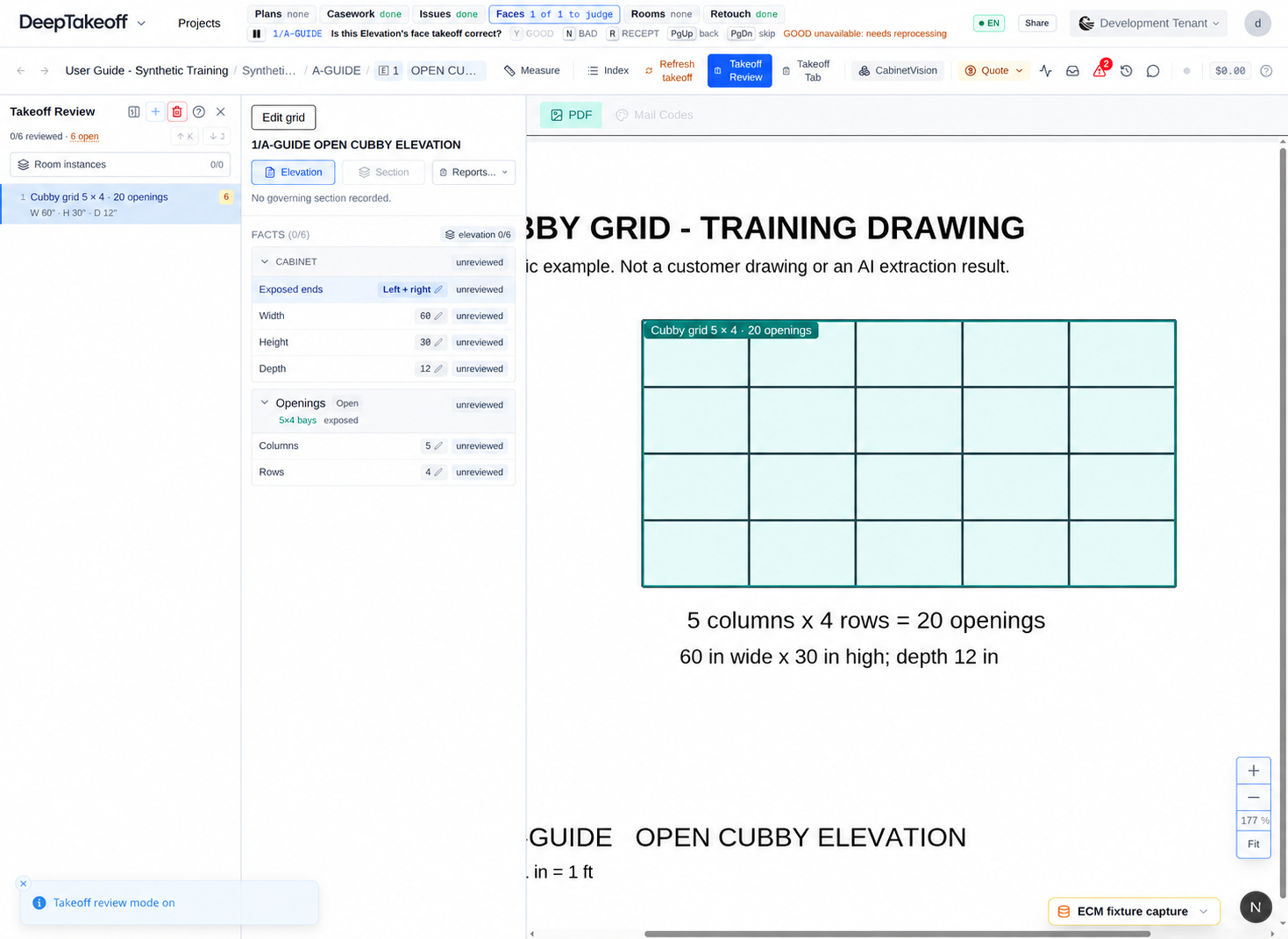
Takeoff Review shows the source and application count. Where offered, Only this cabinet applies the correction locally; All (N) cabinets applies it to the shared fact. Set the correction basis, apply it, and inspect the affected work.
Open the governing drawing beside the takeoff fact.
Choose the individual cabinet or the shared fact where those choices are available.
Review the rebuilt values and the locations that depend on them.
Scope answers
Confident answers can advance the project. Uncertainty stays visible.
DeepTakeoff assesses undecided Elevations with their connected evidence. Confident IN, OUT, or RECEPT answers can be recorded automatically, with the model identified as the author and its reason available for inspection.
Lower-confidence results remain proposals. You can replace an answer, and an existing human decision takes precedence. Reception scope identifies work that still needs its construction and countertop decisions resolved.
AI scope answers, worker corrections, and your final approval are distinct. Recording an answer does not sign off the project.
Project History & current review
A change should be visible to the next person reviewing the bid.
Project History records supported human and AI actions with their affected work. Inspect a change before undoing or redoing it. Actions such as source deletion or an external quotation sync establish a boundary in the undo history.
Snapshots preserve named project states for broader recovery. They complement the action history when revisiting earlier drawing or Room decisions.
A person has accepted the current fact.
A correction is recorded with its basis.
Underlying evidence changed; the earlier review needs another look.
An unresolved dependency prevents the fact from being settled.
Before issue, review source coverage and warnings as well as blockers. Approval applies to the current project state; a changed drawing or scope decision may require renewed review.